What Is a Cron Job in Linux? A Complete Guide to Linux Task Scheduling
A cron job in Linux is a scheduled task that automatically executes commands or scripts at specific times or intervals. Linux administrators use cron jobs to automate repetitive tasks such as backups, system maintenance, log cleanup, database updates, and monitoring processes without requiring manual execution.
Cron is one of the most commonly used Linux task scheduling tools because it is lightweight, reliable, and available by default on most Unix-based operating systems.
What Is a Cron Job in Linux?
A cron job is an automated task scheduler in Linux that runs commands or scripts according to a predefined schedule. It uses the cron daemon, a background service that continuously checks scheduled tasks and executes them at the specified time.
Cron jobs are commonly used by system administrators, developers, and DevOps teams to automate routine server operations.
Examples of tasks that can be automated with cron include:
- Creating database backups
- Cleaning temporary files
- Rotating log files
- Sending scheduled reports
- Checking server health
- Running maintenance scripts
- Synchronizing files
Unlike manually running commands, cron allows Linux systems to perform repetitive tasks automatically.
How Does Cron Job Work in Linux?
A cron job works through three main components:
Cron Daemon
The cron daemon (cron or crond) is a background service responsible for executing scheduled tasks.
It:
- Runs continuously in the background.
- Checks scheduled tasks.
- Matches the current time with cron schedules.
- Executes commands when the schedule matches.
Crontab File
Cron schedules are stored in a file called crontab (cron table).
Users can view their scheduled tasks using:
crontab -l
To edit scheduled tasks:
crontab -e
Each user can have their own cron configuration.
What Is Cron Job Syntax?
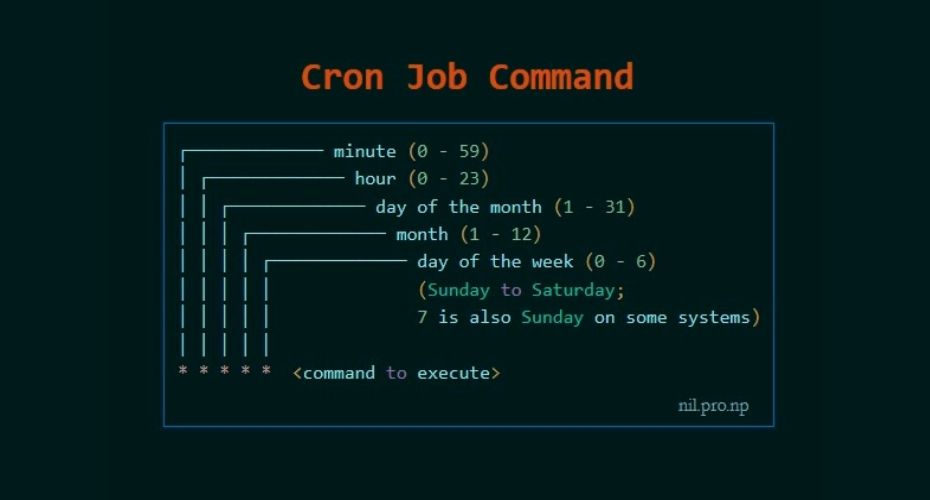
A cron schedule uses five time fields followed by the command that should run.
Structure:
* * * * * command
│ │ │ │ │
│ │ │ │ └── Day of week
│ │ │ └──── Month
│ │ └────── Day of month
│ └──────── Hour
└────────── Minute
Cron Schedule Examples
| Schedule | Meaning |
|---|---|
0 0 * * * |
Run every day at midnight |
*/5 * * * * |
Run every 5 minutes |
0 12 * * 1 |
Run every Monday at noon |
30 2 * * * |
Run daily at 02:30 AM |
0 0 1 * * |
Run on the first day of every month |
How Do You Create a Cron Job in Linux?
Creating a cron job requires adding a schedule and command to the user's crontab file.
Follow these steps:
Step 1: Open Crontab
Run:
crontab -e
This opens the cron editor.
Step 2: Add Your Scheduled Task
Example:
0 2 * * * /home/user/backup.sh
This command runs the backup script every day at 2 AM.
Step 3: Save and Verify
Check your cron jobs:
crontab -l
The system will automatically execute the command according to the schedule.
What Are Common Uses of Cron Jobs in Linux?
Cron jobs are widely used by system administrators, developers, and DevOps teams because they automate repetitive tasks and improve operational efficiency.
Some common use cases include:
Automated Backups
One of the most common uses of cron jobs is creating automatic backups.
Example:
0 3 * * * /usr/local/bin/backup.sh
This runs a backup script every day at 3:00 AM.
Organizations often use cron jobs to:
- Back up databases
- Copy important files
- Archive application data
- Store backups in remote locations
Automated backups reduce the risk of data loss caused by accidental deletion, hardware failure, or system issues.
Log File Management
Linux servers generate many log files that can consume storage over time.
A cron job can automatically:
- Compress old logs
- Remove unnecessary files
- Rotate log files
- Archive historical records
Example:
0 1 * * * /usr/sbin/logrotate /etc/logrotate.conf
This helps maintain server performance and prevents storage problems.
Database Maintenance
Database administrators use cron jobs to automate routine database tasks.
Examples:
- Creating database backups
- Cleaning unused records
- Running optimization scripts
- Exporting reports
Example:
0 2 * * * mysqldump database_name > backup.sql
This creates a scheduled database backup.
System Monitoring
Cron jobs can monitor server conditions automatically.
Examples:
- Checking disk usage
- Monitoring services
- Sending alerts
- Checking application health
Example:
*/10 * * * * /home/scripts/check_server.sh
This runs a monitoring script every 10 minutes.
Website and Application Maintenance
Web administrators often use cron jobs for automated website tasks.
Examples:
- Updating content
- Clearing cache
- Sending scheduled emails
- Running application scripts
- Processing queued jobs
Many content management systems, including WordPress, use scheduled tasks similar to cron for background operations.
What Is the Difference Between Cron Jobs and Manual Commands?
The main difference is automation.
| Manual Command | Cron Job |
|---|---|
| Requires a person to run it | Runs automatically |
| Suitable for one-time tasks | Suitable for recurring tasks |
| Depends on user availability | Runs according to schedule |
| Less reliable for repetitive work | Consistent and predictable |
For example:
A system administrator can manually create a database backup every day, but a cron job ensures the backup happens automatically even when nobody is available.
What Is the Difference Between Cron Jobs and Systemd Timers?
Both cron jobs and systemd timers can schedule tasks in Linux, but they serve different purposes.
| Feature | Cron Job | Systemd Timer |
|---|---|---|
| Simplicity | Easy to configure | More advanced |
| Availability | Available on most Unix systems | Common on modern Linux distributions |
| Logging | Basic | Integrated with systemd logs |
| Dependencies | Limited | Supports service dependencies |
| Best for | Simple scheduled tasks | Complex system operations |
Cron remains popular because it is simple and reliable. Systemd timers are often preferred for modern Linux environments that require deeper system integration.
How Do You Manage Cron Jobs in Linux?
Linux provides several commands to create, view, and manage scheduled tasks.
View Existing Cron Jobs
To display current cron jobs:
crontab -l
This shows all scheduled tasks for the current user.
Edit Cron Jobs
To add or modify scheduled tasks:
crontab -e
This opens the user's cron configuration file.
Remove Cron Jobs
To delete all cron jobs for a user:
crontab -r
Use this command carefully because it removes scheduled tasks permanently.
What Are Common Cron Job Errors?
Cron jobs are reliable, but configuration mistakes can prevent tasks from running correctly.
Common issues include:
1. Incorrect File Permissions
A script may fail if it does not have permission to execute.
Check permissions:
ls -l script.sh
Make the script executable:
chmod +x script.sh
2. Incorrect File Paths
Cron runs with a limited environment and may not know the same paths available in an interactive terminal.
Instead of:
python script.py
Use the full path:
/usr/bin/python3 /home/user/script.py
3. Missing Environment Variables
Cron does not automatically load user profiles such as .bashrc.
If your script depends on environment variables, define them inside the cron file or script.
4. Incorrect Cron Schedule
A small mistake in cron syntax can cause tasks to run at the wrong time or never execute.
Validate your schedule before deploying it.
5. No Logging
Without logs, troubleshooting becomes difficult.
Add output logging:
0 2 * * * /home/user/script.sh >> /var/log/script.log 2>&1
This records both normal output and errors.
Cron Job Best Practices
Following best practices helps keep scheduled tasks secure and reliable.
Use Absolute Paths
Always specify complete paths for commands and files.
Better:
/usr/bin/php /var/www/script.php
Avoid:
php script.php
Add Logging
Keep records of cron execution results to simplify troubleshooting.
Avoid Running Everything as Root
Only use root privileges when necessary. Running unnecessary cron jobs as root creates security risks.
Test Scripts Before Scheduling
Run scripts manually before adding them to cron.
This prevents failed automation in production environments.
Document Scheduled Tasks
Maintain documentation explaining:
- What the cron job does
- Who created it
- When it runs
- Where logs are stored
This makes server maintenance easier.
How Do You Create a Cron Job Using cPanel?
Many website administrators manage cron jobs through hosting control panels instead of using the Linux command line. cPanel provides a graphical interface that makes scheduling tasks easier for users who are less familiar with terminal commands.
To create a cron job in cPanel:
- Log in to your cPanel account.
- Navigate to Advanced → Cron Jobs.
- Select the execution frequency.
- Enter the command or script path.
- Save the cron job.
Example:
php /home/account/public_html/script.php
The server will automatically execute the PHP script according to the selected schedule.
Common cPanel cron job uses include:
- Running website maintenance scripts
- Sending scheduled reports
- Updating application data
- Clearing temporary files
- Running database backups
How Do You Create a Cron Job Using Plesk?
Plesk also provides a graphical interface for managing scheduled tasks on Linux servers.
Steps:
- Log in to Plesk.
- Open Tools & Settings.
- Select Scheduled Tasks.
- Choose the system user.
- Add a new scheduled task.
- Define the command and execution schedule.
Plesk cron jobs are commonly used for:
- Website maintenance
- Automated scripts
- Database operations
- Server administration tasks
Both cPanel and Plesk simplify cron management by allowing users to configure scheduled tasks without directly editing the Linux crontab file.
Why Are Cron Jobs Important for DevOps and Server Management?
Cron jobs remain an important automation tool in Linux environments because they allow teams to schedule repeatable operations without manual intervention.
DevOps teams commonly use cron jobs for:
- Automated backups
- Log management
- System health checks
- Deployment-related tasks
- Data synchronization
- Maintenance scripts
Although modern automation platforms such as CI/CD pipelines, Kubernetes jobs, and workflow automation tools are increasingly common, cron remains valuable for lightweight and reliable scheduled operations.
What Is the Future of Linux Task Scheduling?
Linux task automation continues to evolve as organizations adopt cloud infrastructure and modern DevOps practices.
Traditional cron jobs are now often combined with:
- Container orchestration platforms
- Infrastructure automation tools
- CI/CD systems
- Cloud scheduling services
For example:
- Kubernetes uses CronJobs to schedule containerized tasks.
- Cloud providers offer managed scheduling services.
- Automation tools such as Ansible help manage scheduled tasks across multiple servers.
Understanding cron remains important because many modern automation technologies build upon the same scheduling concepts.
Why Choose Btech for Linux and DevOps Solutions?
Managing Linux servers efficiently requires knowledge of system administration, automation, security, and infrastructure management.
Btech helps organizations improve their IT operations through expertise in Linux administration, DevOps practices, cloud infrastructure, and automation solutions.
From server management and task automation to modern cloud-native environments, Btech supports businesses in building reliable, secure, and efficient technology platforms.
Frequently Asked Questions (FAQ)
What is a cron job in Linux?
A cron job in Linux is an automated scheduled task that runs commands or scripts at specific times or intervals. It is commonly used for backups, maintenance tasks, monitoring, and system automation.
How do I create a cron job in Linux?
You can create a cron job by opening the crontab editor with the crontab -e command, adding a schedule and command, then saving the configuration.
Example:
0 2 * * * /home/user/backup.sh
This runs a backup script every day at 2 AM.
What are the five fields in cron syntax?
The five cron fields represent:
- Minute
- Hour
- Day of month
- Month
- Day of week
Example:
* * * * * command
What are common uses of cron jobs?
Common cron job uses include:
- Automated backups
- Database maintenance
- Log cleanup
- Server monitoring
- Website maintenance
- Scheduled reports
Are cron jobs only available on Linux?
Cron was originally developed for Unix systems and is commonly used on Linux. Similar scheduling tools also exist on other operating systems, such as Task Scheduler in Windows.
What is the difference between cron and a cron job?
Cron is the scheduling service or daemon that manages scheduled tasks. A cron job is an individual task configured to run through the cron service.
Why is my cron job not running?
Common reasons include:
- Incorrect cron syntax
- Wrong file permissions
- Incorrect paths
- Missing environment variables
- Script errors
- Lack of logging
Checking logs and testing commands manually can help identify the problem.